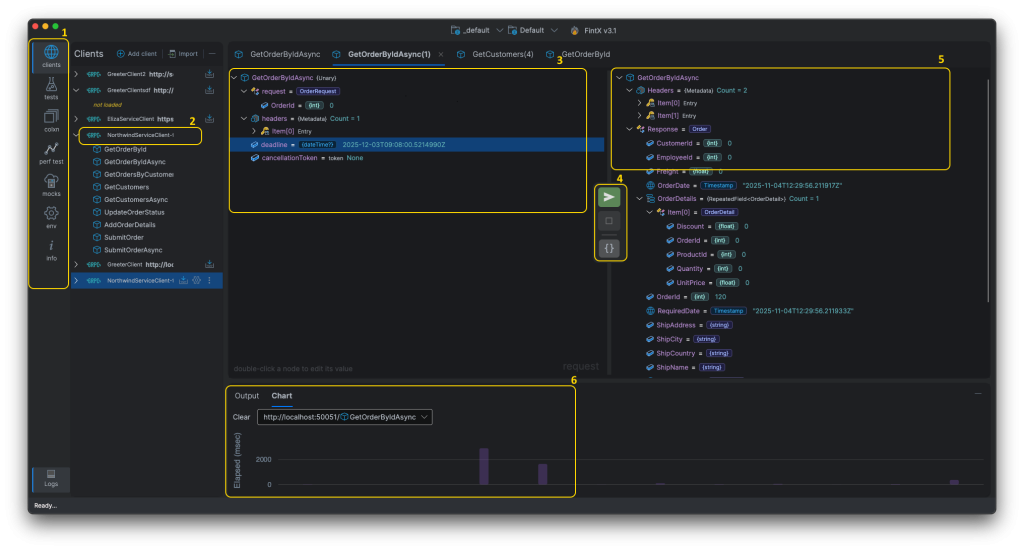
1. Main Menu
client
Shows the explorer panel that contains all gRPC clients. Testing of all methods types such as Unary, Server Streaming, Client Streaming, and Duplex Streaming are supported
tests
Shows the functional test panel that contains all the functional tests defined for each gRPC client. Every functional test allows for a visual comparison of expected and actual responses
colxn (collections)
Shows the collections of functional tests. Each collection contains functional tests that can be executed in parallel or in sequence
perf tests
Shows the performance test panel that contains all the perf tests defined for each gRPC client. Various types of load testing scenarios can be configured for each per test
mock
Shows the mock services panel. gRPC services can be “mocked” by simply providing the protobuf file or address of a reflection service
2. gRPC client
After clicking the Compile button, all the methods of the generated gRPC client will be displayed. Double-click a method to open it in a new tab and start testing it

3. Request Panel
Displays user-friend treeview editor that allows the user to configure the values that will be sent in the gRPC request. For advanced users, the treeview can be displayed as json that can be directly edited
4. Actions
Contains the buttons to trigger actions
- Send the request
- Cancel the request and responses (for streaming methods)
- Toggle between JSON and Treeview
5. Response Panel
Displays the response from the gRPC Service
6.Logs and Charts Panel
Shows the log entries and chart plotting the duration (in msec) of each call to the gRPC service